PICTURES ARE ATTACHED AT BOTTOM
Hi everyone,
I’m having trouble getting my www subdomain to work with Vercel and I’m not sure what I’m missing.
Setup:
-
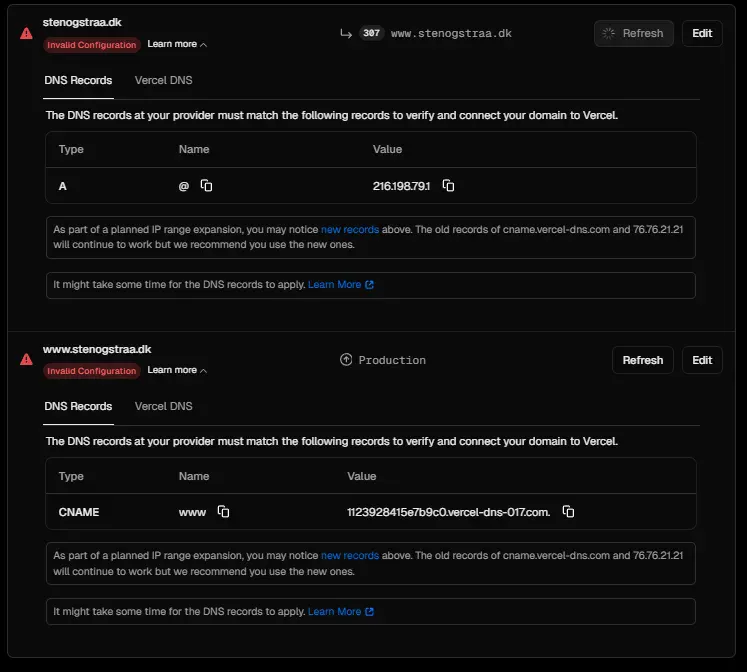
Domain: stenogstraa.dk
-
Root domain (stenogstraa.dk) works fine with A record pointing to 216.198.79.1
-
Trying to add www.stenogstraa.dk but it shows “Invalid Configuration” in Vercel
What I’ve configured:
-
CNAME record for www pointing to: 1123928415e7b9c0.vercel-dns-017.com (exactly as shown in Vercel dashboard)
-
TTL set to 3600
The problem: Vercel dashboard still shows “Invalid Configuration” for the www subdomain. The DNS records appear to match what Vercel is asking for, but the domain won’t verify.
What I’ve tried:
-
Double-checked the CNAME value matches exactly what Vercel shows
-
Waited several hours for DNS propagation
-
Refreshed the Vercel dashboard multiple times
Questions:
-
Is there something I’m missing in the DNS configuration?
-
Should I be using
cname.vercel-dns.cominstead of the project-specific CNAME that Vercel shows? -
Has anyone else experienced this issue where the records appear correct but won’t verify?
I’ve attached screenshots of my Vercel DNS settings and my domain provider’s DNS configuration for reference.
Any help would be greatly appreciated!