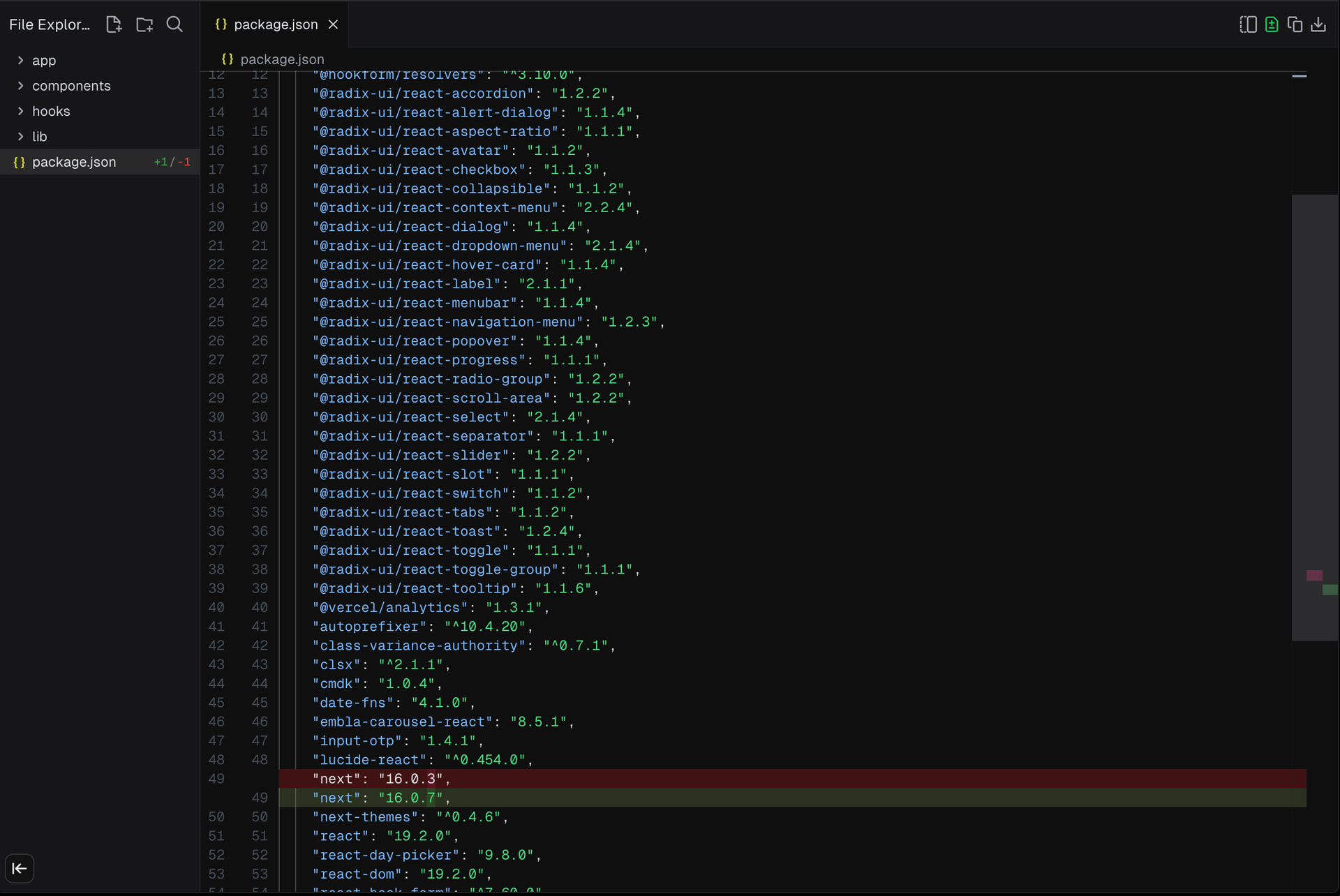
The “Go To Code” feature in the Design Mode is no longer placing the cursor at the intended position of the code in question, on the page. It is simply opening the page without directing the cursor to the correct location and then I have to hunt and find what I think I am looking for. Making some manual edits tricky.
When clicking on “Toggle Diff View”, it no longer shows the green vs red. I can see the number of changes on the left side, but in the actual code it is no longer highlighting those changes as it used to.
Is there any idea on why this is happening when it worked fine (and great) a couple weeks ago and any ETA on when you will fix this? @pawlean@gaspar09@smaeda-ks@anshumanb
The diff toggler should be fixed as soon as they find your post because it has been an on and off issue for a while now. They might be using AI for rapid implementation and we both know it sometimes hallucinates and deletes parts of fixed codebase.
I’m still having an issue with the diff view – but it works when refreshing the page. So if you get to a state where you can’t see your diffs, refresh the page and you’ll see them. Not a great workaround, but it at least exists.
Hoping this is fixed soon, as currently it’s impossible to apply some validation by checking what code was changed. Also, it’s really important that users are notified when anything chnages in the IDE web environment, whether it is bug fixes or new features - please can the team provide a link in bottom left to a What’s New page for new features (e.g: the new File Explorer panel than just appeared one day) rather than seeing updates only on X, a version / build date a detailed changelog as per the Vercel CL page. Thanks.
Is the Diff toggle still not working for you? It works fine now for me with no issues after the other day it was reported and I assumed fixed, since it worked.
Go to code still isn’t working but as @pawlean said the team is on it and I’m sure we will have a fix soon or at least with the new release when it comes.
But odd that the Diff toggle isn’t working. Have you tried the refresh fallback another user reported?
Not working for me in Firefox or Chrome. I would expect to see changed indicators in the far right column showing you where to scroll to, but no of that or diffs appear. Can you send me screenshot of your env working?
@alexcumbers-9492@u14man-9214
It still seems to be working fine for me. No refresh needed at all. Very odd it seems that its fine for some, sometimes working for others, and then not at all for some.
Hey all. Bumping this thread again as the diff view is still pretty broken. Just this week I noticed the new side-by-side diff view. I probably preferred the old format, but that’s not the issue. The issue is that I still need to do a hard refresh. After making changes, v0’s file editor just blanks out the entire editor. The file that got changed is now empty. If I refresh the page it populates with the actual content, and shows diffs.
Really? Still? im honestly very confused on this. It has been working without any issues on my end. no refresh needed or anything.
Im not sure what else to say tbh. I mean you would have the latest I assume so I dont see a reason for it not to be working.
Maybe you can open a new ticket on this, but likely you cant be the only one still experiencing this. So I am sure the team is working on fixes that will be rolled out in updates soon.