Manual purge cache by tag seems doesn't work

Hello there!

I have a Nuxt 4 project hosted on Vercel, and with wildcard subdomains.
I have a server/middleware.ts where I set these headers:

setResponseHeader(event, 'x-subdomain', subdomain)
setResponseHeader(event, 'Vary', 'header=x-subdomain')
setResponseHeader(event, 'Cache-Tag', `${subdomain},subdomain`)
setResponseHeader(event, 'Cache-Control', `public, max-age=0, s-maxage=86400, must-revalidate`)

So when I go to one of my subdomain (https://osso.bandotheque.fm), the headers show that I hit the Vercel Cache, and I can see my cache-tag header :

Name Value
age 504
cache-control public, max-age=0, must-revalidate
cache-tag osso,subdomain
server Vercel
strict-transport-security max-age=63072000
vary header=x-subdomain
x-powered-by Nuxt
x-subdomain osso
x-vercel-cache HIT
x-vercel-id cdg1::cdg1::cqkrw-1761300526220-342c16f891d9

If I try to purge all the cache through the Vercel interface, the x-vercel-cache show MISS, as excepted.

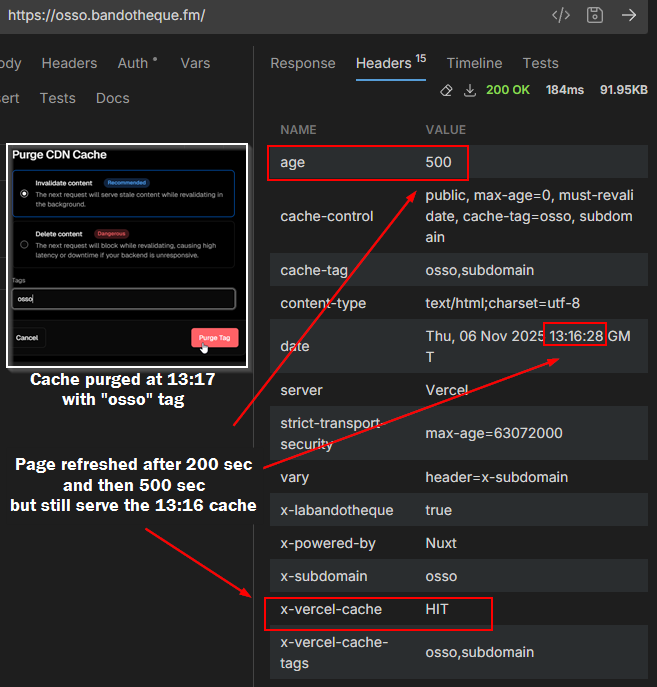
But if I try to purge the cache with a cache tag, like osso, It doesn’t do anything, and the x-vercel-cache is still on HIT:

I also tried osso,subomain or subdomain and it’s the same.

I tried with the Vercel api:
https://api.vercel.com/v1/edge-cache/invalidate-by-tags?projectIdOrName=prj_SzBUtNC3uMfV8wBAFJ9QmImUY7q5

Body:

{
  "tags": ["osso"]
}

And nothing happens to…

As I’m missing something?

Thanks for your help!

:love_letter: A quick note from a non-expert user to the Vercel team:
Cache management is often very confusing. It’s not standardized across CDNs, the documentation is sparse, and it’s hard to know how things behave—especially for non-experts.

Because the Vercel DX is pretty amazing in many points, I thought using Vercel would make cache management easier, but I’m still facing the same issues with opacity, major limitations, and unpredictability. There’s no clear feedback showing the relationship between what you configure and what is actually served.

Even in the documentation, terms like Vercel Cache, Edge Cache, CDN Cache, and Data Cache are used interchangeably, and a non-expert can quickly get lost.

For example, with the x-vercel-cache header:

  • Is it the CDN Cache or the Data Cache? (And is the CDN Cache the same as the Edge Cache?)
  • Which cache is actually hit, and how?
  • My cache-tag appears in the headers, but is it actually taken into account by the cache?

A clearer explanation and better UX around caching, with visible feedback on how settings affect output, would be really helpful :folded_hands:

1 Like

Hey, @labandotheque-9185!

Could you try changing your header from Cache-Tag to Cache-Control with tags included, or use the x-vercel-cache-tags header instead:

// Option 1: Use x-vercel-cache-tags header
setResponseHeader(event, 'x-vercel-cache-tags', `${subdomain},subdomain`)

// Option 2: Include tags in Cache-Control header
setResponseHeader(event, 'Cache-Control', `public, max-age=0, s-maxage=86400, must-revalidate, cache-tag=${subdomain},subdomain`)

Also, make sure you’re using the correct API endpoint format. The invalidation should work with:

POST https://api.vercel.com/v1/edge-cache/purge?teamId=YOUR_TEAM_ID

With body:

{
  "tags": ["osso"]
}

Appreciate the feedback - I’ll share this with the product and docs team!

Thanks for your answer @pawlean !

I tried to add the mentioned headers (option 1, then option 2, then both),
but the manual purge by tag still isn’t working:
purge-bandotheque

As you can see, the x-vercel-cache-tags header is correctly added, but when I try to purge using the osso tag, the cache still returns HIT. However, when I use *, the cache is correctly MISS

I also wanted to try the suggested endpoint https://api.vercel.com/v1/edge-cache/purge?teamId=YOUR_TEAM_ID, but I’m on a Hobby plan and it’s a solo project, so I don’t have a teamId.

I searched on Vercel and on Google for documentation about v1/edge-cache/purge endpoint, but couldn’t find anything! (a good example of what I meant in my previous post about the cache documentation UX)

Where can I find the documentation for this endpoint?

I tried with https://api.vercel.com/v1/edge-cache/purge?projectIdOrName=prj_SzBUtNC3uMfV8wBAFJ9QmImUY7q5, but the API returns a 404 Not Found response.

{
  "error": {
    "code": "not_found",
    "message": "Not Found"
  }
}

Can we use the v1/edge-cache/purge endpoint on hobby plan with a projectId param instead of teamId?

Thanks again for your help!

@pawlean Just wanted to kindly check if anyone had a chance to look into this :slight_smile:

Hello,

Following up on my previous post: I tried the suggestions from @pawlean (Vercel staff)

Method 1: Project Settings > Caches

What I tried:

Use x-vercel-cache-tags header as suggested by @pawlean (but I can’t find any documentation about this header?):

setResponseHeader(event, 'x-vercel-cache-tags', `${subdomain},subdomain`)
setResponseHeader(event, 'Cache-Control', `public, max-age=0, s-maxage=86400, must-revalidate, cache-tag=${subdomain},subdomain`)

First, I tried to manual purge from the Vercel interface but:

:white_check_mark: The headers appear correctly in the response.
:cross_mark: But manual purge by tag still doesn’t work: x-vercel-cache is still HIT.

:white_check_mark: Purge all (*) works as expected — the cache returns MISS.

purge-bandotheque

Method 2: Api endpoint (v1/edge-cache/purge)

Then I wanted to try the suggested endpoint by @pawlean:

POST https://api.vercel.com/v1/edge-cache/purge?teamId=YOUR_TEAM_ID
BODY { "tags": ["osso"] }

:cross_mark: But the suggested endpoint seems doesn’t exists, it returns a 404 Not Found error:

→ I couldn’t find any documentation or examples for using the /v1/edge-cache/purge endpoint, can you tell us where we can find it?

Conclusion

:white_check_mark: x-vercel-cache-tags and Cache-Control headers are correctly added
:cross_mark: On Project Settings > Caches, Purge CDN cache by tag doesn’t invalidate the cache
:white_check_mark: But purge-all (*) works
:cross_mark: v1/edge-cache/purge suggested API endpoint seems doesn’t exists, returns 404 error…
:cross_mark: No documentation about the suggested headers, and no documentation about the endpoint…

So… what am I missing here?
Is this feature simply not supported on Hobby plans, or is there a specific requirement I’ve overlooked?

Thanks again for your help — I really want to understand what’s going on.

Hi @labandotheque-9185, sorry for the delayed response. Let us try to debug this together.

Have you tried waiting for a few minutes? Let’s try debugging from the dashboard side,

  1. Create your request, see if it’s a HIT. Choose a path that no one else uses during our test.
  2. Go to Dashboard and purge the cache.
  3. Wait for 2 minutes. This wait is usually in milliseconds/seconds. But, for this test’s sake let’s wait longer.
  4. Retry the request.
  5. Share the result here.
1 Like

Hi @anshumanb, and thanks for your answer!

I’m on a dev server so no one else use the tested url.

I tried to purge the cache from the dashboard,
then waiting 2 minutes, and 5 minutes, but still serve the old cache…

Thanks for trying it out. Let me recreate it on one of my hobby projects and revert here.

Hi @labandotheque-9185, I tried purging CDN caching and I had the same behavior as you. But, when I purged the data cache. The cache was immediately purged and got a age: 0 response.

Edit: I was using Next.js

I don’t think cache-tag caching is supported in Nuxt. Can you share the exact docs you followed originally? Yes, I agree the docs can be confusing because of various naming convention and the Next.js specific caching features.

Hi @anshumanb, and thanks for your help :slight_smile:

Oh, surprising!
I might be missing something about how caching works, but I don’t quite understand why Vercel respects cache headers for Next.js apps but not for Nuxt.
It seems like a pretty standard behavior, no?

I originally followed these documentation links:

https://vercel.com/docs/edge-cache
https://vercel.com/docs/edge-cache/purge#cache-tags
https://vercel.com/docs/rest-api/reference/endpoints/edge-cache/invalidate-by-tag

However, the documentation seemed somewhat unclear and incomplete, which is why I mentioned it in my first post and asked for some guidance.


Nuxt config

I’m using wildcard subdomains, so I use a server middleware to set the headers:

Toggle Nuxt server middleware

server/middleware/subdomain.ts

export default defineEventHandler((event) => {

  const hostname = event.node.req.headers['x-original-host'] || event.node.req.headers.host || removeProtocol(config.public.baseURL)
  
  const subdomain = getSubdomain(hostname.toString())

  const maxAge = 60 * 60 * 24 * 30; // 30 days

  setResponseHeader(event, 'x-subdomain', subdomain)
  setResponseHeader(event, 'Vary', 'header=x-subdomain')
  setResponseHeader(event, 'Cache-Tag', `${subdomain},subdomain`)
  setResponseHeader(event, 'Cache-Control', `public, max-age=0, s-maxage=${maxAge}, must-revalidate, cache-tag=${subdomain},subdomain`)

  event.context.subdomain = subdomain

})

And then this to handle the route:

Toggle Nuxt router options

app/router.options.ts


export default <RouterOptions>{
  routes: (_routes) => {
    const { ssrContext } = useNuxtApp();

    const subdomain = import.meta.server
    ? ssrContext?.event.context.subdomain as string ?? null
    : getClientSubdomain();

    if (subdomain) {
      const subdomainRoutes = [{
         component: () =>
          import("~/components/Site.vue").then((r) => r.default || r),
          alias: `/@${subdomain}`,
          name: `index`,          
          path: '/',
          props: { subdomain }
      }] satisfies readonly RouteRecordRaw[];

      return subdomainRoutes;
    }

    return _routes;
  }
};

So the particular thing here is I’m using a server middleware instead Nitro route rules in nuxt.config.ts to set headers.

And the headers seems correctly sent, as you can see:

Toggle page headers


So Why does Vercel understand the cache-tag header with Next.js but not with Nuxt?

Do you have some ressources on how Vercel handle the cache-tag for Next.js if it’s not related to the headers?

Maybe @danielroe could help us on this part?

Hi @labandotheque-9185, I see. The docs you share are about cache purging. I’m curious where you learned about using the Cache-Tag header you mentioned in your original post. Because, I couldn’t find it in our docs.

The Cache-Control headers are respected in all responses as per web standards. But, Next.js specifically has Data Cache, which is handled differently. Hence, my experience was different.

Thanks for sharing the code snippets. There’s no cache-tag header in our Cache-Control headers docs.

The Cache tags in Next.js are driven by Framework primitives like Functions: cacheTag | Next.js.

I’m talking to our team to figure out a solution for your use case.